
A gaming gift should do something useful in the teenager’s actual setup. The best gifts for teenagers who love gaming are rarely the ones with the largest controller graphic on the packaging. A compatible headset, a requested controller, or a tool for an existing computer project can matter far more than another slogan light or pair of gaming socks.
These selections cover console controls, computer peripherals, racing, original Switch storage, and optional recording equipment. They serve different platforms and skill interests; none is a universal accessory for every teenager. Ask which exact console, handheld, or computer the recipient uses before choosing a product, even when the brand or connector looks familiar.
The comparisons use documented features rather than claims about measured latency or improved game performance. Bigger equipment can suit a family contribution, while a targeted accessory may be the more natural individual gift. Our guide to choosing a gift people appreciate is useful here: a specific request often tells you more than a general enthusiasm for gaming.
Quick Answer
- HyperX Cloud III Wired Headset — Best Overall: Choose Cloud III for a known need to hear and talk during compatible play or calls.
- Xbox Wireless Controller — Best for a Requested Xbox Controller: A controller becomes a considered gift when it replaces a worn one or makes an already planned local game possible.
- PlayStation DualSense Wireless Controller — Best for a PS5 Setup: The DualSense is strongest when the teenager has already asked for a controller for PS5 play.
Comparison Table
| Product | Best For | Selected Format | Key Consideration |
|---|---|---|---|
| HyperX Cloud III Wired Headset | Best Overall | Black; 3.5mm, USB-C and USB-A connection options | Connection and software features vary by platform |
| Xbox Wireless Controller | a Requested Xbox Controller | Carbon Black; Xbox Series X|S and Xbox One | Windows connection may require separately purchased hardware or cable |
| PlayStation DualSense Wireless Controller | a PS5 Setup | Midnight Black; PS5-focused controller | Advanced effects depend on game and connection support |
| Nintendo Switch Pro Controller | an Original Switch Controller Request | Original Switch controller; USB-C to USB-A cable | This is not the Nintendo Switch 2 Pro Controller |
| Logitech G502 HERO Wired Mouse | Customizable Mouse Controls | Eleven programmable buttons; adjustable weights | Shape and button placement need recipient approval |
| Keychron C3 Pro Keyboard | a Compact Wired Keyboard | Wired 87-key TKL; brown switches; red backlight | No dedicated number pad |
| Logitech G29 Driving Force Wheel and Pedals | a Racing-Simulation Group Gift | PS5, PS4 and PC; wheel and pedal set | Requires suitable mounting and floor space |
| Elgato Stream Deck Mini | a Teen Who Likes Computer Customization | Six LCD macro keys; Mac and PC | Needs a compatible computer and configuration |
| Elgato Wave:3 USB Microphone | a Requested Voice-Recording Setup | USB condenser microphone; Wave Link software | Requires compatible computer software and connection |
| Elgato HD60 X Capture Card | Gameplay Recording Projects | External HDMI capture with passthrough | Requires a suitable computer and source setup |
| SanDisk Nintendo Switch microSDXC Card | Original Switch Storage | 128GB; original Switch, OLED and Lite | Not designed for Nintendo Switch 2 |
| JSAUX HB0603 Docking Station | a Compatible Handheld Desk Setup | Selected six-in-one dock; no charger bundle | Selected configuration is not a charger bundle |
1. HyperX Cloud III Wired Headset — Best Overall

The wired HyperX Cloud III offers a practical starting point when a teenager needs game audio and a microphone in one device. The selected black configuration has 3.5mm, USB-C, and USB-A connection options, with a microphone mute indicator. That gives the gift a more substantial role than a decorative headset stand without a headset.
Check the connection path for the actual platform. Software-dependent features are not necessarily identical across a computer, a console controller jack, and a USB connection. The over-ear fit also remains individual, so it is strongest as a requested replacement or a model the recipient has already expressed interest in.
Pros
- Microphone supports game chat and calls
- Microphone mute indicator provides visible feedback
- Wired configuration avoids headset battery management
- Multiple connection formats offer platform options
- Angled 53mm drivers provide a defined audio layout
Cons
- Connection and software features vary by platform
- Headband and ear-cup fit remain personal
Choose Cloud III for a known need to hear and talk during compatible play or calls. A discreet check of the current headset and available connection can preserve the surprise while preventing a gift that looks right but cannot serve the intended setup.
To buy this product, click here.
2. Xbox Wireless Controller — Best for a Requested Xbox Controller

An Xbox Wireless Controller is a purposeful gift for a teenager using an appropriate Xbox system or a documented compatible computer setup. The Carbon Black configuration includes the hybrid D-pad and textured grip details of the selected controller. A second controller can also support local multiplayer when the actual game allows it.
Do not assume that every Windows device is ready to connect without another purchase. A compatible cable, Bluetooth capability, or adapter may be required, and battery arrangements should be checked. The gift decision starts with the system and intended connection rather than a general claim that wireless controllers work everywhere.
Pros
- Hybrid D-pad provides directional control
- Textured triggers and grips provide handling detail
- First-party format suits a requested Xbox replacement
- Compatible Windows connection provides another possible role
- A second controller can support compatible local multiplayer
Cons
- Windows connection may require separately purchased hardware or cable
- Battery requirements need checking before gifting
A controller becomes a considered gift when it replaces a worn one or makes an already planned local game possible. Ask which platform and games the teenager uses, then choose this exact model rather than substituting another controller because its color is more striking.
To buy this product, click here.
3. PlayStation DualSense Wireless Controller — Best for a PS5 Setup

The DualSense in Midnight Black provides a first-party controller direction for a PS5 owner. Haptic feedback and adaptive triggers are documented features in supported games, while the microphone, dedicated mute button, and headset jack offer several audio-control choices. Those functions give it a clear platform-specific purpose.
Availability of advanced effects depends on the game and connection, especially outside its primary console role. This is not an interchangeable Xbox accessory. Check whether the recipient needs a spare controller, a replacement, or a particular configuration before turning a recognizable PlayStation product into an automatic purchase.
Pros
- Haptic feedback works with supported games
- Adaptive triggers provide supported game effects
- Built-in microphone supports voice use
- Dedicated mute button controls microphone capture
- 3.5mm jack accepts an appropriate headset
Cons
- Advanced effects depend on game and connection support
- Not an interchangeable Xbox controller
The DualSense is strongest when the teenager has already asked for a controller for PS5 play. A replacement that supports familiar games can be more welcome than a completely new gadget, particularly when the family has a clear place and charging routine for it.
To buy this product, click here.
4. Nintendo Switch Pro Controller — Best for an Original Switch Controller Request

Nintendo’s original Switch Pro Controller offers motion controls, HD rumble, and built-in amiibo functionality for relevant games. A USB-C-to-USB-A charging cable is included in the selected listing. It can suit a teenager who wants a full-size alternative to using separate Joy-Con with an original Switch setup.
Keep the generation clear: this is not the Nintendo Switch 2 Pro Controller. If the recipient owns a newer system, check the exact compatibility and restrictions rather than promising the newer controller’s functions. amiibo figures are also separate purchases, and the presence of a reader does not include any figure or game content.
Pros
- Motion controls support compatible games
- HD rumble provides a documented feedback feature
- Built-in amiibo functionality supports relevant games
- Charging cable is included
- Full-size controller offers an alternative to separate Joy-Con
Cons
- This is not the Nintendo Switch 2 Pro Controller
- amiibo figures are not included
Choose this controller for an explicit original-Switch preference and a supported game routine. A short question about the hardware generation is more useful than guessing, and it avoids giving an older configuration when the teenager had a different controller in mind.
To buy this product, click here.
5. Logitech G502 HERO Wired Mouse — Best for Customizable Mouse Controls

The G502 HERO offers eleven programmable buttons, adjustable weights, and a dual-mode scroll wheel in a wired mouse. That makes it relevant to a computer player who wants more control assignments or prefers to tune the handling. It is an equipment choice with identifiable differences from a simple generic mouse with decorative lighting.
Shape and button placement matter more than a headline sensor number to the person holding it. Confirm that the teenager wants this layout and can use the required software. A console-first player may have little reason to own it, and there is no basis for promising that different hardware will improve competitive results.
Pros
- Programmable buttons support custom controls
- Adjustable weights allow a chosen handling setup
- Dual-mode scroll wheel adds a distinct control option
- Wired use avoids a mouse battery routine
- Onboard memory supports stored settings
Cons
- Shape and button placement need recipient approval
- Customization requires compatible software and device support
The G502 fits a recipient who has described a need for more mouse controls or this particular shape. Let them decide the assignments and weight arrangement, so the gift supports their preferences rather than arriving with someone else’s idea of the ideal settings.
To buy this product, click here.
6. Keychron C3 Pro Keyboard — Best for a Compact Wired Keyboard

The C3 Pro selected here is an 87-key tenkeyless keyboard with brown switches and red backlighting. QMK/VIA support allows remapping on a compatible setup, while the missing number pad leaves a narrower keyboard format. Those details make it a more specific gift than a box described only as a mechanical gaming keyboard.
Brown switches, a wired connection, and red lighting are deliberate configuration choices. They are not the same as a wireless keyboard with full RGB effects. Ask about switch preference, layout, and whether a number pad is needed for school or other work before choosing the smaller arrangement.
Pros
- Tenkeyless format reduces width compared with a number-pad layout
- QMK/VIA supports remapping
- Brown switches provide a defined switch choice
- Red backlighting makes legends visible
- Mac and Windows modes support different computer setups
Cons
- No dedicated number pad
- Wired brown-switch configuration is not a wireless RGB model
A keyboard is personal equipment, so the C3 Pro is best given around a named interest in this layout and switch type. The teenager can then configure keys for their own games and everyday computer work without having to accept an unfamiliar setup chosen by the giver.
To buy this product, click here.
7. Logitech G29 Driving Force Wheel and Pedals — Best for a Racing-Simulation Group Gift
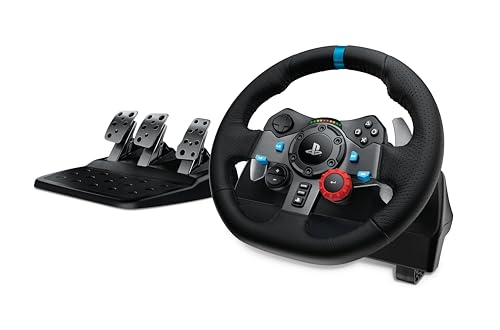
The G29 combines a force-feedback wheel with pedals for supported PS5, PS4, and PC racing setups. Its 900-degree steering range and adjustable pedal faces give it a distinct role beyond ordinary controller play. It can be a substantial family contribution when a teenager already spends time with compatible racing games.
Mounting, floor space, and storage are part of the purchase. This is not the Xbox-oriented G920, and a wheel is not useful for every kind of game. Check the exact title support and the desk or rig arrangement before promising that the present will work immediately in a crowded bedroom.
Pros
- Wheel and pedals create a focused racing setup
- Force feedback adds a supported game feature
- 900-degree rotation provides a defined steering range
- Adjustable pedal faces support setup choices
- Included pedals avoid a wheel-only purchase
Cons
- Requires suitable mounting and floor space
- Not the Xbox-oriented G920 configuration
The G29 is most thoughtful when it completes a setup the teenager and family have already discussed. Agree on where the wheel and pedals will live, so opening a substantial gift leads to a usable activity rather than an unexpected furniture problem.
To buy this product, click here.
8. Elgato Stream Deck Mini — Best for a Teen Who Likes Computer Customization

The Stream Deck Mini is a six-key LCD macro controller for a compatible Mac or PC, not a handheld games console. Its appeal is assigning clearly labeled actions and sequences to physical keys. It can suit a teenager interested in customizing computer workflows alongside games, creative software, calls, or school presentations.
It requires configuration and a computer. Someone who plays only on a console may not have a useful role for it, and it should not be confused with a Steam Deck because the names sound similar. Choose it for an interest in controls and software, not simply because the product is popular in gaming setups.
Pros
- LCD labels identify assigned actions
- Six keys provide a compact control surface
- Software supports remapping actions
- Multi-action sequences can group commands
- Useful computer apps extend use beyond gaming
Cons
- Needs a compatible computer and configuration
- Not a handheld gaming console
The Mini is a coherent gift for a teenager who enjoys building their own shortcuts and computer arrangements. Let the first project be something they already want to simplify, rather than assuming the device means they should start streaming publicly.
To buy this product, click here.
9. Elgato Wave:3 USB Microphone — Best for a Requested Voice-Recording Setup

The Wave:3 supplies a dedicated USB condenser microphone for a compatible computer. Its cardioid capsule and Wave Link software provide a defined audio-workflow direction, including multiple sources and separate mixes. That can serve an existing interest in recording commentary, making videos, or improving an established desktop voice setup.
A microphone still captures the room around it, and placement matters. It is not a plug-in replacement for every console headset arrangement. Check the computer, software, and intended use with the recipient and family before selecting equipment associated with recording or online sharing.
Pros
- Dedicated microphone separates voice capture from the headset
- Cardioid capsule provides a defined pickup approach
- Wave Link supports multiple audio sources
- Independent mixes support an audio workflow
- USB format avoids requiring an XLR interface for normal setup
Cons
- Requires compatible computer software and connection
- Desk placement and room sound affect recordings
Give Wave:3 when voice recording is already a chosen project, including private recordings or ordinary calls. The gift can support learning the tools without suggesting that public broadcasting, an audience, or monetization is the expected next step.
To buy this product, click here.
10. Elgato HD60 X Capture Card — Best for Gameplay Recording Projects
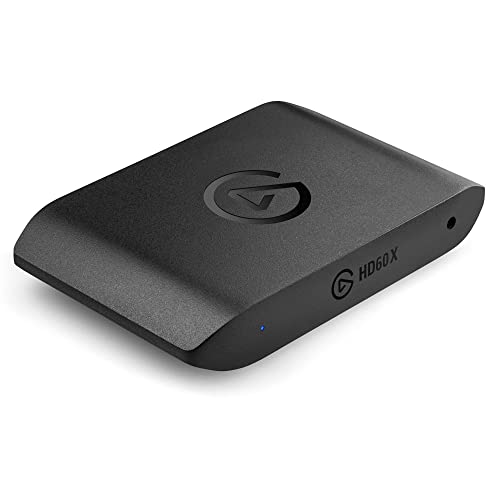
The HD60 X is an external capture device for a suitable HDMI source and computer workflow. Passthrough allows a playing display and a capture arrangement to serve separate roles, and compatible applications can record footage for later editing. It belongs with a teenager who has specifically asked to make gameplay videos rather than simply play games.
Capture resolution and passthrough resolution are different specifications. Check the complete source, display, computer, and software requirements before purchase. The card does not create a standalone recording setup by itself, nor should the gift imply a requirement to upload anything publicly.
Pros
- Passthrough separates playing display from capture
- Windows and Mac setup is listed
- Works with compatible capture apps such as OBS
- External format avoids opening a desktop computer
- Can support recording gameplay for later editing
Cons
- Requires a suitable computer and source setup
- Capture resolution and passthrough resolution are different
The HD60 X has a clear purpose for an existing recording plan that the family understands. Ask what the teenager wants to capture and edit, then choose the equipment around that plan instead of treating a capture card as a general performance upgrade.
To buy this product, click here.
11. SanDisk Nintendo Switch microSDXC Card — Best for Original Switch Storage
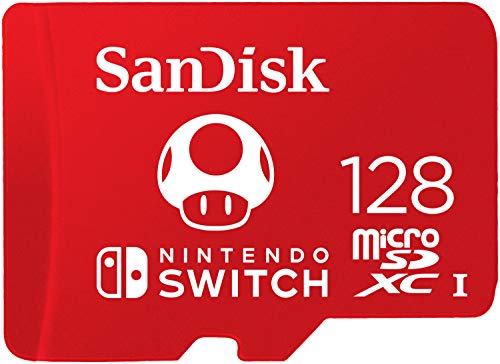
This SanDisk microSDXC card adds a nominal 128GB of storage for the documented original Switch, Switch OLED, and Switch Lite systems. Downloaded games, screenshots, and captures provide concrete reasons to need the space. It is a focused functional addition rather than a decorative item that merely mentions gaming.
The selected card is explicitly not designed for Nintendo Switch 2. That restriction is more important than the Nintendo licensing on the label. Actual usable capacity is also lower than the nominal figure, and storage needs vary with the recipient’s existing card and downloads.
Pros
- Adds storage to the documented Switch systems
- 128GB gives a defined capacity
- Supports storing downloaded games
- Can hold screenshots and video captures
- Small card adds no separate desktop device
Cons
- Not designed for Nintendo Switch 2
- Actual usable storage is less than the nominal capacity
Choose this card only after confirming the exact Switch generation and the current storage arrangement. It can be an appropriate smaller gift when space is the real problem, but a newer console requires a different storage decision rather than a hopeful substitution.
To buy this product, click here.
12. JSAUX HB0603 Docking Station — Best for a Compatible Handheld Desk Setup
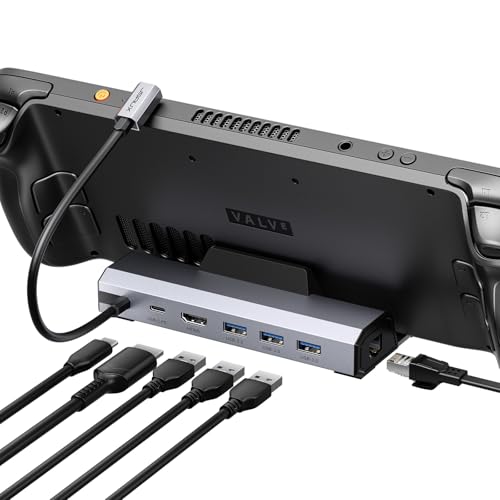
The selected JSAUX HB0603 dock brings HDMI, three USB-A ports, Ethernet, and USB-C power delivery to a supported handheld arrangement. That makes it useful when the teenager wants a chosen handheld at a desk with external accessories. It has a specific connectivity purpose rather than simply serving as a decorative stand.
The selected configuration is not the charger bundle. Check suitable power, display requirements, case clearance, and the actual device; the listing explicitly excludes ROG Xbox Ally and Xbox Ally X. Do not convert a broad compatibility headline into a promise about every similarly named handheld.
Pros
- HDMI provides an external-display connection
- Three USB-A ports accommodate accessories
- Gigabit Ethernet provides a wired networking option
- USB-C power delivery supports suitable charging setups
- Dock format organizes a compatible handheld at a desk
Cons
- Selected configuration is not a charger bundle
- Listing excludes ROG Xbox Ally and Xbox Ally X
A dock is a strong gift when the intended desk connections are already known. Confirm the model printed on the handheld and the accessories to be attached, then let the purchase solve that exact setup rather than create new equipment requirements unexpectedly.
To buy this product, click here.
Buying Guide
Identify the Exact Platform Before Shopping
Ask for the console or handheld generation and whether the recipient mainly plays on a computer. Similar names can conceal different storage, controller, and connection requirements. A photograph of the existing equipment or a named wish list can preserve the surprise while preventing a substantial mismatch.
Find the Missing Function
A headset, controller, microphone, and capture card answer different requests. Start with what the teenager wants to do that the current setup cannot comfortably support. Gaming branding alone does not establish usefulness, and an accessory should not be sold as a route to better scores or guaranteed performance.
Check the Whole Setup
Ports, software, power supplies, mounting, and storage space affect first use. A dock without the needed charger or a wheel without a mounting location can become an expensive unfinished project. Confirm included parts for the exact configuration and agree on any additional purchases before treating the gift as complete.
Respect Personal Control Preferences
Mouse shape, keyboard switches, headset fit, and controller layout are individual. Let the recipient name a preference where possible. A compatible product can still be the wrong gift if it replaces a carefully chosen control format. Keep packaging and a suitable exchange option when the decision depends on fit.
Coordinate Larger Gifts With the Family
A wheel or recording setup can be suitable as an agreed contribution. Our group gift etiquette guide can help organize that choice. Recording equipment should support an existing project and household preferences, not introduce expectations about public streaming or buying additional services.
FAQ
Are gaming-themed clothes and decorations always poor gifts?
No, when the teenager specifically wants them. They should not replace useful equipment merely because the giver does not know the setup. A well-matched accessory or a personal note can have more relevance than several unrelated objects printed with controllers.
Can I use a USB connector as proof of compatibility?
No. The connector shape does not establish console support, software features, power requirements, or a suitable audio path. Check the exact product and platform arrangement. A computer accessory is not automatically a console accessory.
Is the Stream Deck Mini a Steam Deck?
No. Stream Deck Mini is a computer macro-key controller. Steam Deck is a handheld gaming system. The names are similar, but their functions and requirements are different; choose the Mini only for a compatible computer workflow.
Does the selected SanDisk card work with Switch 2?
No. The listed 128GB card is for the original Switch family, including OLED and Lite, and explicitly excludes Switch 2. Confirm the hardware generation before choosing storage rather than relying on the Nintendo name alone.
Will a capture card make games run faster?
That is not its purpose. HD60 X supports a capture workflow involving a source, display, computer, and compatible software. It is relevant to recording and editing plans, not a general upgrade for every teenager who enjoys gaming.
Should I buy an advanced accessory as a surprise?
Only when the intended function and required setup are known. A discreet question is worthwhile for a wheel, microphone, dock, or capture card. The recipient can still be surprised by the occasion and presentation without being surprised by incompatible equipment.
Final Verdict
HyperX Cloud III is the Best Overall option here when a teenager has a clear need for a wired headset and a supported connection. It combines listening and voice functions in one practical gift, while fit and platform-specific features still need checking.
A platform-matched controller is the more direct choice for a replacement request. The G29 suits an agreed racing setup, while recording and macro-control devices belong with specific computer projects. Choose the function first; the exact hardware generation then decides which gift is eligible.